Category Archives: Uncategorized

Full Moon, Christmas Lights and Mobile Homes

I decid­ed to catch a few Christ­mas light pic­tures before the sea­son ends and the full moon is a bonus. These pic­tures were tak­en before it was com­plete­ly dark, try­ing to catch some blue sky and clouds to con­trast the lights. The moon is a bit over­ex­posed in these shots which can be reme­died by merg­ing low­er exposed shots I took from the same posi­tion, in oth­er words, HDR. These are out of the cam­era with a lit­tle tweek­ing in Light­Room.

In addi­tion to vis­i­ble sky, I like the col­ors, the tree sil­hou­ettes and the reflec­tions in the auto­moibles and water in the street.


Pumpkin Pie Stop Action Animation

I took over 1100 pic­tures of Lori mak­ing a pump­kin pie and cre­at­ed a stop action ani­ma­tion using the hum­ble Win­dows Movie Mak­er. It turns out that nei­ther of my Win­dows machines are pow­er­ful enough for Pho­to­shop to con­vert that many RAW files in one action or Win­dows Movie Mak­er to ren­der them into a video larg­er then for an iPod.

I over­came that prob­lem by con­vert­ing half of the RAW files at a time to 720x480 jpgs, com­press­ing them down to 5. In order to cre­ate an AVI file in Movie Mak­er, I had to cre­ate 12 dif­fer­ent videos of 100 pic­tures each and then com­bine them to make one com­plete video. For post­ing on Smug­Mug, I then saved the video in anoth­er small­er for­mat.

Look­ing back, I could have shot the orig­i­nal pic­tures in jpeg at the cor­rect res­o­lu­tion sav­ing a big step. And I need to fig­ure out the best for­mat to save it for the web. Still work­ing these things out.

It’s not too bad. Click the pic­ture below and check it out. And then read my own crit­i­cal review below.

More thoughts: I learned a few things here, after repeat­ed view­ings.

1 - I observe the expo­sure chang­ing near­ly every frame, as Lori moves her arms in and out of the pic­ture. The cause? I used aper­ture pri­or­i­ty mode. As things move around, espe­cial­ly the black sleeves of Lori’s shirt, the “cor­rect” expo­sure changes and the cam­era adjusts the shut­ter speed. While her arms are now cor­rect­ly exposed a change can be seen in sur­round­ing areas such as in the wood­en cab­i­nets.

Once I deter­mined the best expo­sure set­ting, I should have worked in man­u­al mode which will lock those set­tings in. Do not change them! Deter­min­ing that cor­rect expo­sure is the trick. Using man­u­al mode, chances are not every scene will be per­fect­ly exposed, (ie; the black shirt mov­ing in and out of the pic­ture and mov­ing to var­i­ous scenes with­in the kitchen). You need to exper­i­ment and find the set­tings that bal­ance expo­sure for the whole of the ani­ma­tion.

2 - I also see the focal length chang­ing, or at least appears to change. Watch the edges of the video as they dis­ap­pear and reap­pear. My guess is the aut­o­fo­cus is adjust­ing as arms and items move around the frame. The solu­tion again is to set the best focus for the scene and turn off the auto­mat­ic focus. I need to ver­i­fy this with the next ani­ma­tion.

3 - The col­or and bright­ness are dull. I filmed this at night under a mix of incan­des­cent and full spec­trum flu­o­res­cent light­ing. I set the white bal­ance to incan­des­cent and did not use a white or grey card. I thought the col­ors looked pret­ty accu­rate.

Maybe what this need­ed was more light. A faster lens would help too, enabling faster shut­ter speeds. It would also allow a small­er aper­ture and a greater depth of field, bring­ing more into focus.

To sum­ma­rize what I have learned, con­sid­er using man­u­al expo­sure set­tings and turn aut­o­fo­cus off. Bring in more light then you think you need, espe­cial­ly to com­pen­sate for low light lens­es you may not own. If the project is impor­tant, rent the equip­ment you need. Learn to use the soft­ware and know the capa­bil­i­ty of your com­put­er.

For soft­ware, I may look into Adobe Pre­mier Ele­ments. Sim­i­lar to Pho­to­shop Ele­ments, it appears that Pre­mier Ele­ments pro­vides all the basic tools need­ed to cre­ate and edit video for about a 1/5 of the price of the full blown pro­gram.

Foothill College Contemporary Big Band

The con­tem­po­rary big band pro­gram at Foothill Com­mu­ni­ty Col­lege appears to be end­ing it’s long run, falling vic­tim to the sad econ­o­my. Under the baton of John Gove, the bands attract­ed many of the bay area’s first call play­ers as well as pro­vid­ing a friend­ly envi­ron­ment for up and com­ing stu­dents. Con­tem­po­rary music was the key. From Jim McNeely to Maria Schnei­der to Thad Jones to obsure Duke Elling­ton pieces and also local com­posers such as Ray Brown. I lis­tened to my wife Lori prac­tice the most bizarre trom­bone and piano parts and picked up quite an edu­ca­tion by proxy. While oth­ers record­ed their end of semes­ter con­certs, I start­ed tak­ing pic­tures and have put togeth­er a col­lec­tion. Click here or any of the pic­tures below to go to the full gallery.

Open PPGBA Meeting this Thursday


I just recent­ly learned of the Pro­fes­sion­al Pho­tog­ra­phers of the Greater Bay Area which appears to be anoth­er valu­able resource for pic­ture snap­pers, espe­cial­ly in the San Fran­cis­co bay area.

They are hold­ing their annu­al “Sus­tain­ing Mem­bers” meet­ing Thurs­day, Novem­ber 19, free and open to every­one. Guest speak­er Ed Pin­gol will dis­cuss light­ing. There will also be sev­er­al pho­to labs and oth­er ven­dors show­ing their wares.

Click here for more details.

Great Horned Owls

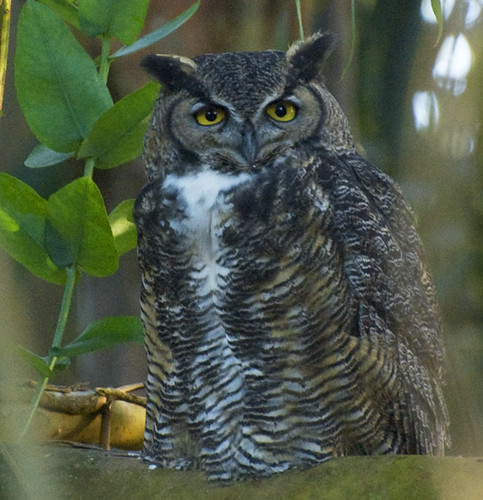
Birds are great sub­jects. They are plen­ti­ful and col­or­ful. They are fleet­ing which make still pic­tures of them chal­leng­ing and all the more appre­ci­at­ed. A friend recent­ly showed me a pic­ture of a great horned owl tak­en just a short walk from my home and I real­ized I need­ed owl pic­tures of my own.

2 owls live in the euca­lyp­tus grove right down the street. I can hear them hoot­ing as I type this. They do not seem much afraid of us and often sit rather close to an access­able path. They also sit very still. This is an advan­tage as I am shoot­ing them in late evening light and in deep shad­ows. With the aper­ture wide open, I am using 1/10th of a sec­ond or slow­er shut­ter speed.

Accord­ing to Wikipedia, we have a male and female. The male being the small­er of the two and with a low­er pitched song. All the hoot­ing may be courtship rit­u­als in progress. If so, they would build a nest and lit­tle owls would appear in the ear­ly spring. All in all, an excel­lent pho­to doc­u­men­tary oppor­tu­ni­ty and blog wor­thy too.

If I am cor­rect, in the pic­tures above, the first is the male. The sec­ond, the female, is not wink­ing at me. She appears to have lost her right eye.

I will be pho­tograph­ing them as often as I am able. I am using a Nikon D80 with a Nikkor 70–300 4.8/5.6 lens usu­al­ly cranked out to 300mm and still requir­ing some extreme crop­ping. Using a tri­pod and remote trig­ger helps. Focus­ing through the branch­es is anoth­er chal­lenge. I hope to score some great shots going for­ward and post­ing them here.

Great Horned Owl

This was my first shot and hand held at that! He was sit­ting in a great loca­tion.

Worlds Collide Concert Pictures

From a core group of musi­cians, 3 unique per­for­mances emerge. “Worlds Col­lide” at the Lit­tle Fox The­ater this past Sun­day evening was a jour­ney through the minds of the Mur­ray Low Trio, the Aaron Ling­ton Quin­tet and John Wor­ley with Bari Bari. We often expe­ri­ence these musi­cians while fol­low­ing our friend John Wor­ley’s gigs but he was more the side man for this show, pro­vid­ing us the expo­sure we rarely make the effort to see. And the icing on the cake was the oppor­tu­ni­ty to pho­to­graph every­thing from the bal­cony of the the­ater.

Click­ing any of the pic­tures below will take you to the full pho­to gallery.

Backyard Bird Photography

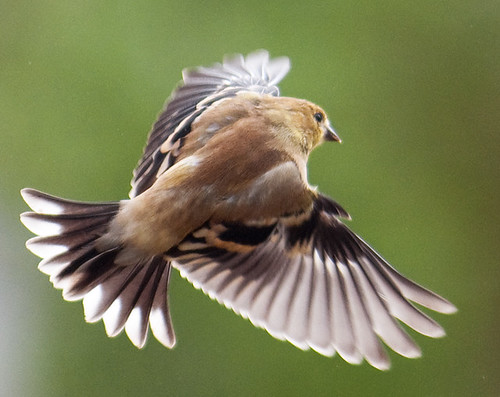
In order to improve my skill sets for action pho­tog­ra­phy, I took on the project of shoot­ing birds in flight. Our back­yard feed­er attracts a large amount of col­or­ful finch­es who do not seem to have a great fear of my pres­ence, at least when I am sit­ting still. I take advan­tage of this vir­tu­al­ly free oppor­tu­ni­ty and spend hours sit­ting, observ­ing and pho­tograph­ing these crea­tures.

I have writ­ten my expe­ri­ence up as a tuto­r­i­al (with some of my favorite pic­tures) and post­ed it to the Instructa­bles web site. Instructa­bles is a fun Do-it-your­self site with con­tent entire­ly pro­vid­ed by the mem­bers. It is free to view and, if you would like to con­tribute, free to join.

My tuto­r­i­al is enti­tled “Back­yard Bird Pho­tog­ra­phy” and click­ing here will take you there.

This tuto­r­i­al is also entered in thi­er Dig­i­tal Pho­tog­ra­phy Con­test, so…, if you are a mem­ber of Instructa­bles and are so inclined, you have my per­mis­sion to vote for me.

Update: The tuto­r­i­al picked up one of 5 first prizes, a week­end pho­tog­ra­phy work­shop put on by Pop­u­lar Pho­tog­ra­phy mag­a­zine. I know I need it and I guess the judges thought so too.

Fall colors

Filters

It is time I learned a lot more about on cam­era fil­ters. Fil­ters, by def­i­n­i­tion remove some­thing from that which they are fil­ter­ing. Cam­era fil­ters remove somthing from the light enter­ing your cam­era, maybe a col­or or the amount of light or block­ing light com­ing from spe­cif­ic direc­tions. I felt the need to get me some of these fil­ters and the more I researched, the more prod­ucts avail­able (at many dif­fer­ent prices) and the more infor­ma­tion I found.

One good (online and free) primer that explains fil­ter basics and then goes on to give brief descrip­tions of 2 dozen com­mon fil­ters and how they can com­pli­ment your pho­tog­ra­phy can be found at:
http://www.digicamera.com/features/filterprimer/index.html

One way to nar­row the choic­es is to think about what effects you are aim­ing for or con­sid­er a prob­lem you just can’t seem to over­come with the cam­era as is. I am look­ing to soft­en mov­ing water in bright light and also reduce glare from shiny sur­faces. From my read­ing, a neu­tral den­si­ty (ND) fil­ter should help with the for­mer. It appears to block all col­ors equal­ly hence block­ing just the amount of light enter­ing the cam­era. For the lat­ter, a polar­iz­ing fil­ter, specif­i­cal­ly a cir­cu­lar polar­iz­ing fil­ter sounds about right.

So an ND and a cir­cu­lar polar­iz­ing fil­ter sound like a good start for my needs. Now, to deter­mine which brand and qual­i­ty to pony up for. Peo­ple like Scott Bourne sug­gest bying the best, espe­cial­ly if you have expen­sive lens­es. “Why put a cheap fil­ter on an expen­sive lens?” He and Rick Sam­mon often com­ment about fil­ters on their pod­casts which can be found at http://photofocus.com/.

One last inter­est­ing fact is that no pro­fes­sion­al pho­tog­ra­phers seem to rec­om­mend a plain or UV fil­ter just to pro­tect the front of your lens as any extra glass will degrade your pic­ture. Since I need all the help I can get, there are no UV fil­ters on my cam­eras.

So, I will update this entry when I decide and buy some fil­ters. More to come!

First Stop Action Animation Video

This blog is all about learn­ing pho­tog­ra­phy and I have no prob­lem show­ing “first attempts” even though I feel it is not my best work.

I took a series of about 200 pic­tures from a hill above the Reno Bal­loon Race and cre­at­ed a stop action video of the mass ascen­sion. Click on the pic­ture to go to the video.

Using Pho­to­shop I cre­at­ed an action that adjust­ed lev­els, bright­ened, added con­trast and resized the 200 pic­tures. I then import­ed them into Win­dows Movie Mak­er, con­fig­ured a few things like set­ting each frame to dis­play for 1/8 of a sec­ond and I exper­i­ment­ed with sev­er­al dif­fer­ent qual­i­ty set­tings. The Win­dows pro­gram was very easy to work with and is free as opposed to buy­ing and learn­ing Pre­miere. I have not looked at oth­er video pro­grams.

One improve­ment for this video would be to not move the cam­era between shots. The jumpi­ness is a bit annoy­ing. The expo­sure changes too. I believe I left the mode at aper­ture pri­or­i­ty as the sun was going in and out due to the clouds and it gets a lit­tle dark at the end. Set­ting the expo­sure and using man­u­al might have helped. Not every frame is in focus either, at least in the begin­ning. I noticed that the auto focus changed as the bal­loons moved. After a few frames, I focused and then turned off the AF.

Anoth­er help­ful hint would be to set the cam­era to take the pic­tures at a spe­cif­ic fre­quen­cy. I had rent­ed a D90 and could not eas­i­ly fig­ure this out when I need­ed to. I took the shots man­u­al­ly, count­ing to 10 when not much was hap­pen­ing and more fre­quent when the bal­loons were ris­ing.

And there is no music! Maybe Yakki­ty Sax would fit.

All in all, it was a fun project that can still be improved on. And the lessons learned are most impor­tant!

Update: I neglect­ed to include a use­ful web tuto­r­i­al on stop action ani­ma­tion that was a big help to get­ting start­ed:
http://www.wikihow.com/Create-a-Stop-Motion-Animation